Create a client
A client is an organization you manage. Each client has its own devices, tenant, enrollment keys, and standards.
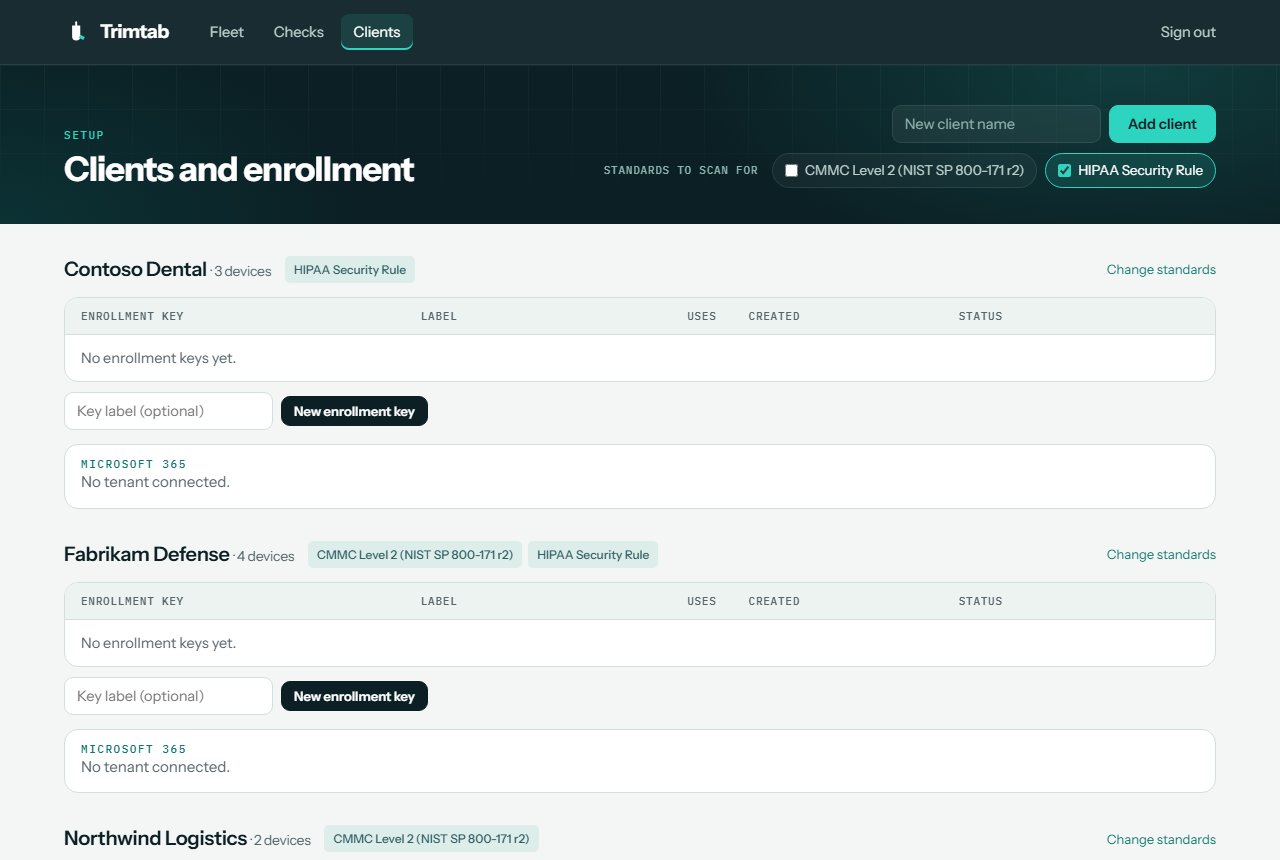
Add a client
- In the Bridge, open Clients.
- Enter the client's name in New client name.
- Under Standards to scan for, tick every standard the client is held to.
- Select Add client.
You must pick at least one standard.
Choosing standards
| Choose | When the client |
|---|---|
| CMMC Level 2 | Is a defense contractor or subcontractor that handles Controlled Unclassified Information (CUI) |
| HIPAA Security Rule | Is a covered entity or business associate that handles electronic protected health information (ePHI) |
| Both | Has both obligations, or you want the broadest coverage |
Standards control what the client sees and how they're scored. A HIPAA-only client isn't scored on CMMC-only items like the logon banner or FIPS mode. Checks that map to both standards, such as MFA, count for either.
Scans always collect everything
Lookout and tenant scans collect every check regardless of standards. Only the display and score change, so you can switch a client's standards at any time and see updated results immediately, without a rescan.
Change a client's standards
- Open Clients and find the client. Its current standards show as tags next to its name.
- Select Change standards.
- Tick or untick standards, keeping at least one.
- Select Save.