Fleet
The Fleet page is the Bridge's home screen: every device and Microsoft 365 tenant across your clients.
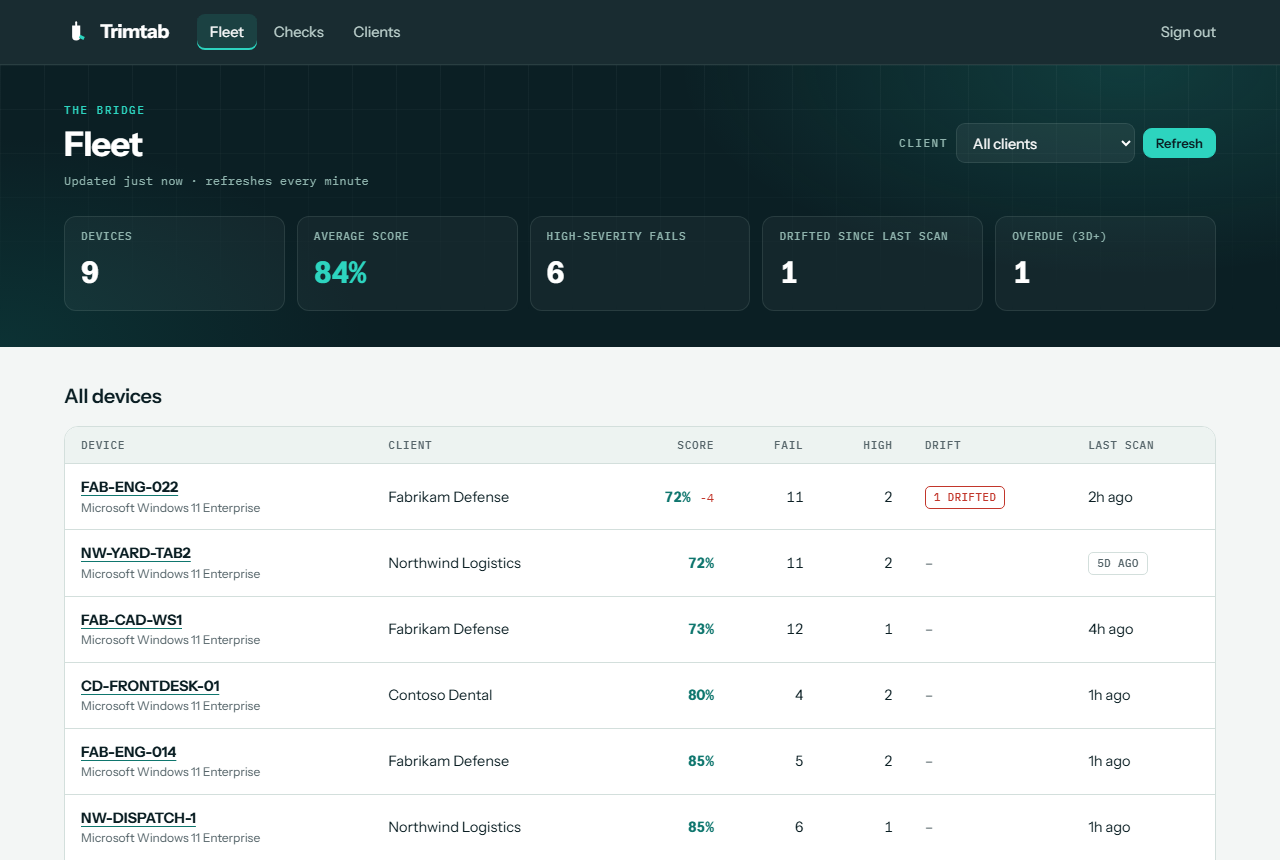
Summary tiles
| Tile | Meaning |
|---|---|
| Devices | Devices and tenants shown, after any client filter |
| Average score | The average score across them |
| High-severity fails | How many have at least one failing High-severity check |
| Drifted since last scan | How many have a check that passed last time and fails now |
| Overdue (3d+) | Devices that haven't reported in for 3 or more days |
The fleet list
| Column | Meaning |
|---|---|
| Device | Hostname or tenant domain. Tenants carry an M365 tag. |
| Client | The client it belongs to |
| Score | The score for the client's standards, with the change since the previous scan |
| Fail / High | Failing checks, and how many of those are High severity |
| Drift | Checks that drifted since the previous scan |
| Last scan | When it was last scanned. A grey tag means it's overdue. |
The list is sorted with the lowest scores first, so the devices that need the most attention are at the top.
Filter, refresh, and rescan
- Client: choose a client to show only its devices and tenants. Choose All clients to clear it.
- Refresh: reloads the page. The page also refreshes itself every minute while it's open, and shows when it was last updated.
- Rescan tenants: runs the Microsoft 365 scan for every connected tenant. Results appear within a minute or two. Devices report on their own schedule; to scan a device now, see Lookout.